Products · Blackbaud CRM
Listbuilder Plus
Listbuilder Plus makes the Blackbaud listbuilder even more powerful. Filter your list, click Save, and it appears in the ad-hoc query designer as a selection, with every filter intact.
One-time purchase, no subscriptions, and a 30-day money-back guarantee. Your download link and license key arrive by email right after checkout. Need a quote, an invoice, or to pay against a purchase order? Email sales@nonprofit-complete.com.
Screenshots · click to enlarge
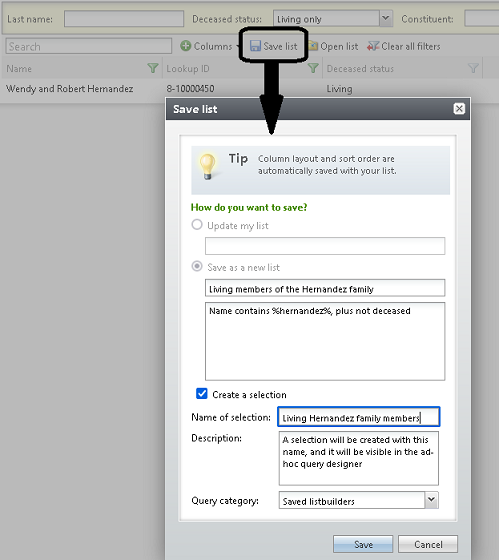
Save any listbuilder
Almost every listbuilder in CRM can be saved as a selection, with every filter intact. That includes Blackbaud’s own listbuilders and any custom listbuilder you’ve built, as long as it has a record type.
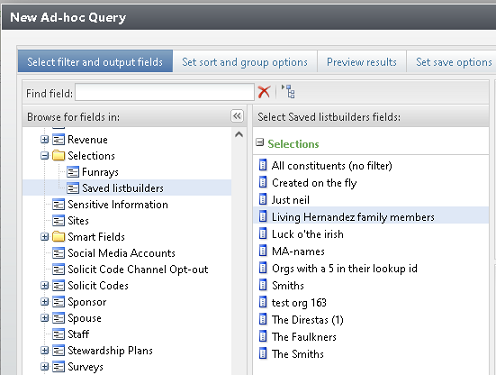
Use it in ad-hoc query
Your saved selection shows up in the ad-hoc query tool just as if you had imported it from a file, ready for queries, exports and everything else selections are good for.
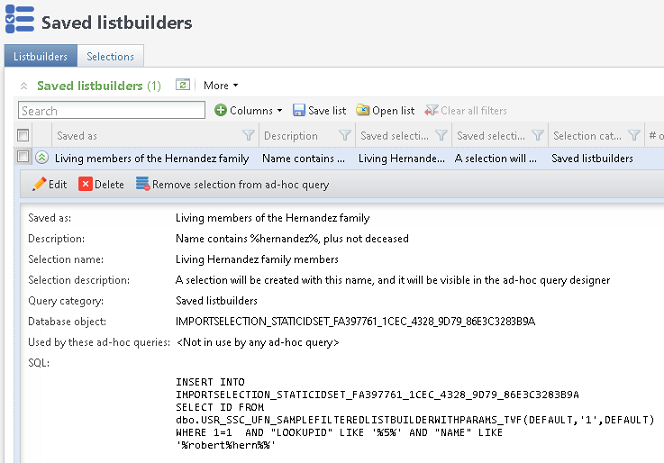
See what’s behind each one
A new Saved listbuilders page lists every saved listbuilder, with the SQL used to build it. A second tab lists every selection in CRM, with the process that created it, its row count and its underlying database object.
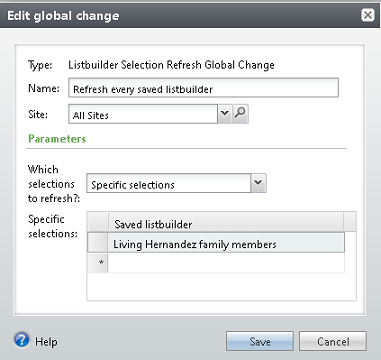
Keep selections fresh
Refresh every saved listbuilder, or hand-pick specific ones, with the Listbuilder Selection Refresh global change. Each refresh re-runs the query, so the selection reflects your data as of that moment.
Requirements
Blackbaud CRM. Install it by copying two folders to your server, or with the Blackbaud self-service deployment tool if you’re hosted by Blackbaud.
Licensing
A single $1,499 purchase. Your license key arrives by email with your download link.
Help when you need it
Start with the Listbuilder Plus documentation, or visit our support page to get in touch.
Turn every list into a selection.
Filter it, save it, query it. No exports, no re-imports.