Products · Blackbaud CRM
Roly Poly
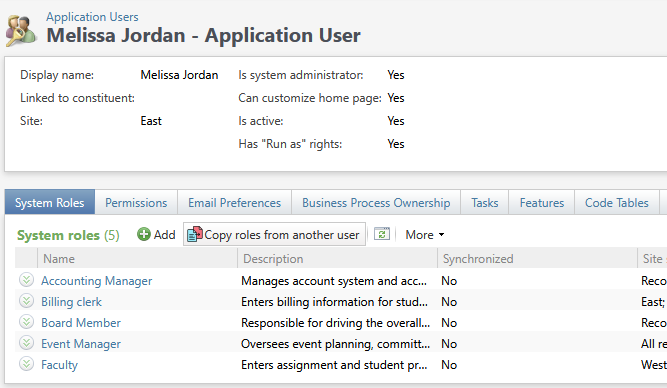
Set up a new Blackbaud CRM user in seconds. Roly Poly copies security roles and other permissions from one application user to another, so a new staff member can start with exactly the access their colleague already has.
Free to download and use. No license key, no sign-up. The documentation includes a step-by-step installation guide.
Screenshots · click to enlarge
Copy from a model user
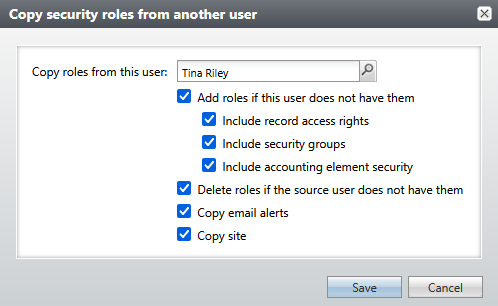
Open any CRM user, click Copy roles from another user, and search for someone whose access you want to copy. Roly Poly gives this user the roles they’re missing, without clicking through each role one at a time.
Bring the details along
A role is only as useful as the rights that come with it. For each role it copies, Roly Poly can also copy that role’s record access rights, security groups and accounting element security.
Add, remove, or fully sync
Turn on Delete roles if the source user does not have them and Roly Poly also removes roles this user has but the model user doesn’t. Combined with adding the missing ones, the two users end up with exactly the same roles.
Email alerts and site, too
Give the user the same email alerts as the model user, and the same site. Email alerts are only ever added, never removed, so nothing the user already subscribes to is lost.
Requirements
Blackbaud CRM. And employees. Not much use without those.
Price
Free. No purchase and no license key: download it, install it, and be ready for your next onboarding to go more smoothly.
Help when you need it
Start with the Roly Poly documentation, or visit our support page to get in touch.
Stop rebuilding permissions by hand.
Free, quick to install, and ready the next time someone new joins your team.