Roly Poly
Roly Poly is a simple, free customization that makes it easy to copy permissions from one application user to another in Blackbaud CRM.
Category: Blackbaud CRM
- Download Roly Poly and unzip the file. Inside, you’ll find a bin folder and a browser folder.
- Copy both folders into the vroot folder on your server.
- Log into Blackbaud CRM and go to Administration > Application > Catalog Browser.
- Filter for a type of Package and an author of Nonprofit Complete.
- Load the RolyPoly package.
The deployment package is also compatible with the Blackbaud CRM cloud deployment tool.
Open the application user you want to update. On the System Roles tab, click Copy roles from another user.
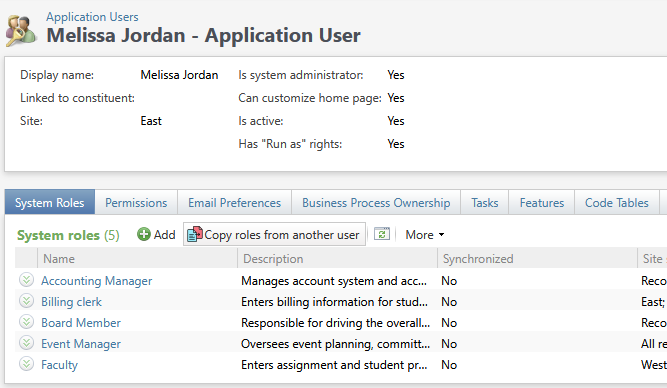
Choose the user to copy from, then pick which permissions to bring across. Each option is described below.
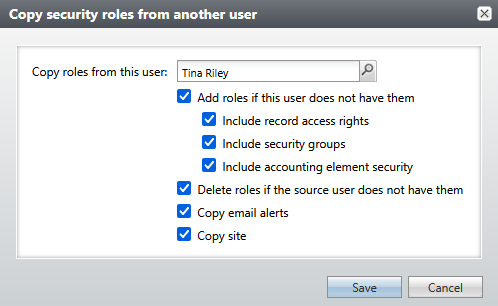
Search for a user whose permissions are a model for the current user.
Look for roles that the “copy from” user has, but this user does not. Add them to this user.
Within each copied role, also copy over the record access rights for that role.
Within each copied role, also copy over the security group rights for that role.
Within each copied role, also copy over the accounting element security rights.
Look for roles that the current user has, but the “copy from” user does not. Delete them from the current user.
When combined with Add roles if this user does not have them, this fully synchronizes the roles.
Give this user the same email alerts that the “copy from” user has.
Note: this does not remove any email alerts from the current user. It only adds.
Give this user the same site that the “copy from” user has.